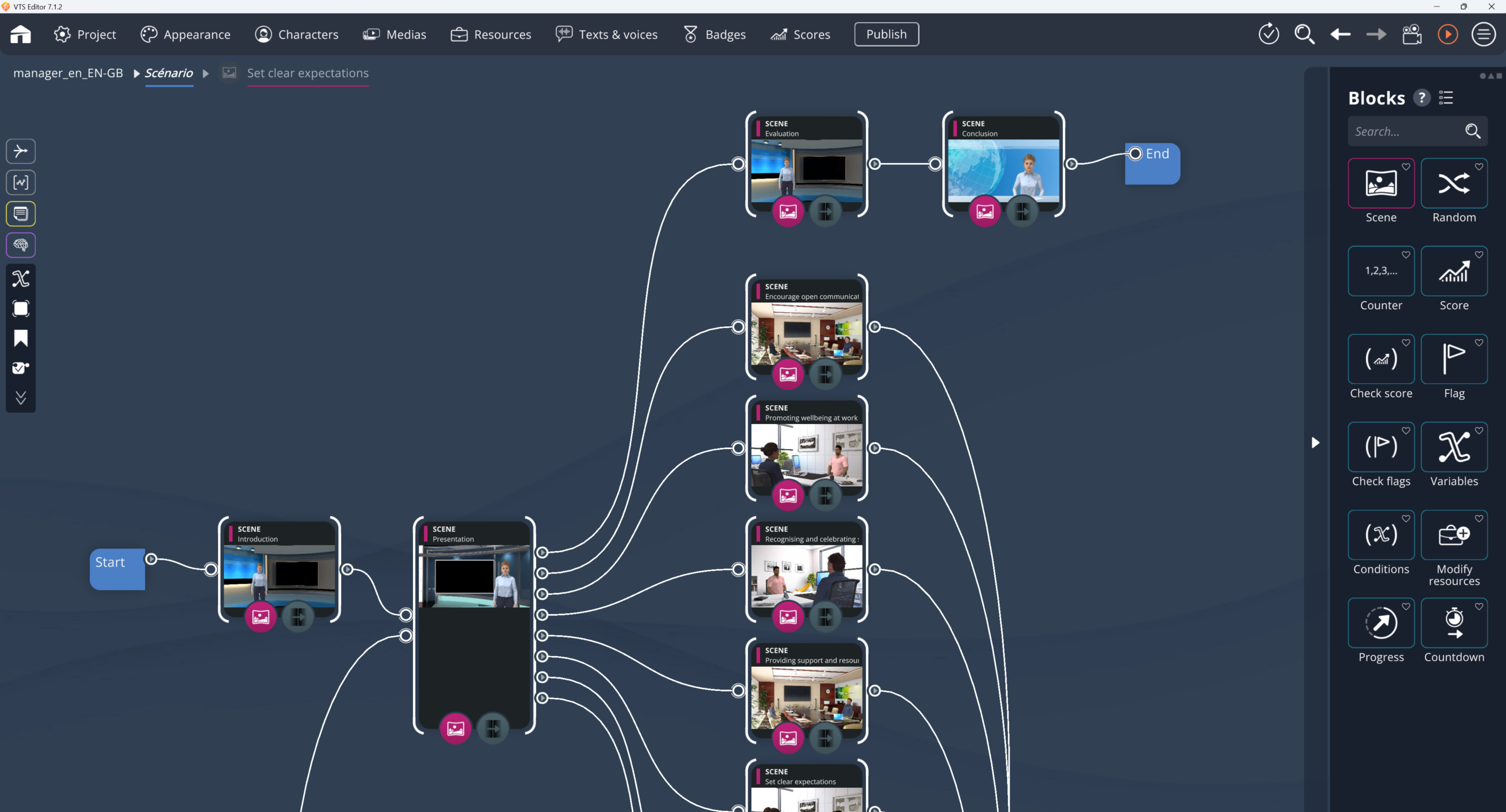
Building a few interactive modules—let’s be honest—isn’t where things get complicated. The real tipping point comes when you have to pull off a scenario-based e-learning rollout at scale, with dozens of modules (sometimes far more) for thousands of learners, across multiple job roles, multiple languages, multiple countries. At that point, you’re not playing in the same league anymore.
From there on, it’s no longer just about “doing e-learning.” You have to produce at a steady pace, distribute without creating an incident factory, fix things fast when something blocks, compare what’s happening from one audience to another and, despite it all, keep a visible instructional coherence. That’s the real topic. Not the showroom effect. Not the one module that impresses once and that you don’t feel like maintaining three months later.
What lasts over time usually rests on a very concrete foundation: scenarios designed to be reused, an asset production pipeline that doesn’t blow up at the slightest change, and a delivery setup that can bring back usable data. Truly usable data, not just a vaguely reassuring completion rate.
With that in mind, the Serious Factory ecosystem—VTS Editor, SF Studio, VTS Perform, with SCORM export if needed—was designed to support scaling up without turning every project into a technical or graphic job site. To learn more about the overall approach, you can also check out Revolutionize your E-Learning strategy with Serious Factory.
Training 200 people at HQ is still manageable manually. Training 10,000 people, spread across multiple countries and multiple functions, is something else. The problems change in nature. It’s no longer enough to stack modules in a catalog; you have to maintain versions, demonstrate observable effects, and above all recover data that lets you take action. Otherwise, you’re driving in the fog, with pretty charts on the wall.
Scenario-based e-learning rollout: what are we talking about exactly?
A scenario-based e-learning pathway isn’t just content that runs through information in a straight line. It’s not a dressed-up slideshow. The idea is something else: the learner enters a situation, acts, chooses, sometimes makes mistakes, sees what their decision produces. Then they move forward with that feedback, not with a disembodied abstraction.
And that changes a lot of things.
Because you’re no longer only trying to make content stick. You’re working on a way of acting. A behavior. A job gesture. Sometimes even a relational stance.
At small scale, that’s already useful. At large scale, it becomes structuring. An organization isn’t only trying to broadcast identical information to everyone. It’s mainly trying to reduce gaps between teams, between sites, between veterans and newcomers, between what is prescribed and what really happens in the field.
That’s exactly where situational practice gains value: it makes the gaps visible. And, crucially, it allows you to measure them. To go deeper into the format, you can consult Interactive Role Play.
Behind most large-scale deployments, the same question comes up: how do you get practices to converge, then improve them, without rebuilding everything from scratch every six months? The scenario-based pathway fits this constraint well, because it connects learning, observation, and steering.
Scenario-based e-learning rollout: lock in the right objectives before producing
Many projects start to weaken very early. Not because of a bug, not because of a tool. Because of initial fuzziness.
“Improve customer relationships,” for example—everyone understands the intention. But to build a steerable module, it’s too vague. “Handle an objection without creating unnecessary escalation,” now you’ve got something. You can observe what the learner does, test it, assess it, compare it.
That’s the level of precision you should aim for.
In general, the preparatory work follows a simple logic, at least on paper. You start from a real situation, with its constraints: time, available tools, level of pressure, risks, room for maneuver. Then you identify the few decisions that truly change the outcome of the situation. Not fifteen. Three, four, sometimes six. Beyond that, everything gets diluted. Then you connect these decisions to a limited number of competencies, to keep the reading clear. Finally, you define explicit thresholds, and what happens if those thresholds aren’t met: another attempt, micro-remediation, mandatory resource, an additional mini-case—in short, a concrete response.
In VTS Editor, this can translate into a competency-based scoring logic, with thresholds that can be checked via blocks like Check Score, and clear control of success or completion via Progression. The value isn’t only technical. It’s methodological: even if paths differ depending on the learner’s choices, the results remain comparable. To discover the tool, see Design software for gamified E-Learning modules made easy with AI.
Take a management case. You create a simulation of a corrective feedback meeting. Five competencies are involved: listening, clarity, respect, emotion management, ability to build an action plan. Each phrasing chosen, each reaction to the other person, weighs on one or another of these dimensions. At the end, you can require a minimum on some of them—70% on clarity and respect, for example. If that’s not met, there’s no need to send the learner back to the start of the entire module: you trigger targeted remediation, then a new, shorter role-play centered on the sticking point. It’s more precise. And it’s easier to maintain.
Make the pathway adaptive without creating a maze
Adaptive learning, on paper, is appealing. You imagine highly personalized, very lively pathways. Then reality kicks in: too many branches, too many cases, too much maintenance. And after a while, no one really knows what the module is measuring.
The healthiest rule is often simple: let it diverge where it’s instructionally useful, then reconverge as soon as possible.
In other words, you adapt the consequences, the feedback, the immediate remediation. You don’t invent an entire pathway with every click. This reconvergence is essential. First for maintenance: if a regulatory change forces you to correct fifteen branches, the system won’t hold. Second for analysis: if every learner lives a totally unique experience, comparison becomes fragile.
In VTS Editor, this approach relies on an assembly of interaction blocks—Sentence Choices, Quiz, True/False, Clickable Areas, Drag and Drop—and logic blocks—Flag, Check Flags, Score, Check Score, Counter, Switch, Random, Reset. The goal isn’t to multiply branches to “look rich.” The goal is to build readable, solid, reusable patterns.
Example, on the compliance side. If a learner trivializes a critical risk, you don’t let them continue as if nothing happened. You apply a penalty on the relevant competency, insert a micro-remediation, then place them back into a neighboring situation to check whether the right reflex is setting in. The pathway remains non-linear, sure. But it doesn’t turn into a headache.
And it must be said clearly: adaptation only has value when it serves a learning logic. Otherwise, it just becomes a cost. Sometimes a very big cost.
The realism of a role-play: more than just graphics
A question comes up often: do you need developers or graphic designers to produce a credible serious game?
Not necessarily. And often, the decisive point isn’t where you think it is.
With VTS Editor, the logic is to avoid programming thanks to a visual block-based interface. But above all, one simple thing must be remembered: the realism of a situational simulation doesn’t depend only on visual rendering. It also depends—and sometimes first—on the rhythm of the scene, reactions, nonverbal cues, the weight given to consequences.
Simple levers that reinforce immersion
- dialogue and its history, to reread the exchange;
- facial expressions, which create subtext;
- posture animations, which convey intention;
- gaze direction, valuable for making the interaction believable;
- sound, finally, which anchors the scene in an environment.
In VTS Editor, this is handled in particular through the Speak, Emotion, Character Animation, Gaze, and Sound blocks, with spatialization possible.
Take a case in industrial safety. A rushed visitor refuses to wear protective glasses. The learner has to react. If they give in, the scene must carry that trace: the safety manager’s reaction, a drop in the score tied to safety culture, a reminder of the risk, then a new role-play on a variant. What anchors learning, ultimately, isn’t the rule being recited. It’s having made a decision—bad in this case—and then having felt its cost.
As for gamification, it’s often better to keep a light hand. Scores, yes. Badges, maybe. But as instructional landmarks, not as smoke and mirrors. The Score block can be used to assess competencies, Badge to materialize a milestone, and Progression to manage what will be reported as success or completion in the platform or LMS.
Industrializing a scenario-based e-learning rollout: build a system (not a stack of modules)
It’s often at this moment that organizations truly change their perspective. At five modules, you can still hack things together. At twenty, fifty, two hundred, hacking comes at a steep price.
The right question is no longer only: how do we produce? It becomes: how do we produce fast without losing control over quality, and then how do we maintain the whole thing without rebuilding everything with every change in rules, offering, or context?
In VTS Editor, three levers are particularly useful.
Reusable functions, variables, variable media
First, reusable functions. They allow you to group complete sequences, then call them elsewhere via Function Call, rather than manually copying the same blocks. Next, variables, especially in the INTEGRAL pack, useful to personalize a pathway, remember choices, vary feedback, or lighten a graph that has become too dense. Finally, variable media, very practical when you need to replace an image, a video, or a skin without reconfiguring an entire branch.
Imagine a standardized debrief. You create a function that displays a message, plays a sound, changes a score, then routes to the next step. You call it wherever it’s useful. If the tone of feedback evolves, or if the brand guidelines change, a single modification is enough. Said like that, it seems trivial. In reality, it’s the kind of choice that avoids the “Rube Goldberg machine” effect six months later.
Manage multiple audiences without duplicating pathways
Same logic for multi-audience. The same scenario can serve both a new hire and a manager, as long as you adjust certain parameters: level of help, access to resources, success thresholds, number of hints. This avoids creating two parallel modules when a common base does the job perfectly well.
Anticipate multilingual (instead of suffering through it)
For multilingual, you need to anticipate early. Some phrasing works very well in French and immediately overflows in German. Voice timing shifts from one language to another. Some nuances don’t translate well. VTS Editor supports multilingual projects, and it’s possible to route certain branches based on the publication language when cultural adaptation is required. Not just a vocabulary adaptation.
The bottleneck: asset production
When volumes increase, it’s not always ideas that are missing. It’s simpler: back-and-forth, chain edits, tangled approvals. That’s where everything gets stuck.
To avoid that, you need a clear asset pipeline. And above all, you need to separate validation tracks. Mixing instructional validation, SME validation, and media validation into a single loop is a classic mistake. With every edit, everything starts over. Timelines stretch, versions contradict each other, and no one really knows what’s approved.
A simple pipeline to produce at volume
- instructional script scoping: situations, decisions, feedback;
- breakdown into scenes, interactions, scoring logic, and remediation;
- production of sets, characters, visuals, voices, or videos;
- integration into the authoring tool;
- functional, instructional, analytics, and compatibility testing;
- go-live, then short iterations.
SF Studio fits precisely into this logic when you need to produce assets at scale, maintain narrative and graphic consistency, and avoid quality dropping as you scale up.
Voice: studio or synthesis, a maintenance question
Voice deserves a clear choice. Studio recording often delivers a more embodied result, but it makes updates more expensive. Text-to-speech, on the other hand, is lighter to maintain, especially when frequent corrections are needed. VTS Editor makes it possible to generate synthetic voices and adjust pronunciation. In both cases, one rule remains true: write short. Short sentences are easier to listen to, translate better, and age better.
On the validation side, a time-boxed workflow (with a consolidation owner) changes a lot. Business, training, compliance: each reviews at their time, on their scope. Without that discipline, late feedback sometimes costs more than production itself.
SCORM, LMS, web, mobile: choose based on the field
This question is often presented as a purely technical trade-off. In practice, it’s rarely that simple.
The real issue is elsewhere: through which channel can you guarantee access, traceability, updates, and a continuous improvement cycle that stays sustainable?
The SCORM format, delivered via an LMS, remains relevant when the LMS serves as the official system of record, when training history must be tracked within a standardized framework, or when the pathway must integrate into an existing setup. VTS Editor supports SCORM export.
But in other contexts, the logic changes. If populations are mobile, dispersed, loosely connected to the LMS; if content changes often; if you’re aiming for a more granular reading of results by step or by competency, then a dedicated platform or a web/mobile player can become more suitable.
VTS Perform was designed for that: to deliver and steer scenario-based experiences at scale, alongside the LMS, or depending on use cases, instead of it for certain targeted cases. See also Deploy your e‑learning courses with our LMS platform.
Steering a scenario-based pathway: measure what helps you decide
Standard reporting sometimes gives a flattering impression of control. A completion rate, an average score, a number of enrollments—it reports well, it’s readable, it reassures a committee. But to decide what to fix, it’s often too thin.
To steer a scenario-based pathway, three questions are often enough:
- Do learners make it to the end?
- Do they actually succeed?
- And above all: where do they drop off, hesitate, fail?
The most useful indicators generally fall into three families:
- progress: completion, drop-offs by step, time spent;
- performance: pass/fail, overall score, score dispersion, scores by competency;
- friction: problematic scenes, repeated hesitations, abnormally long time, localized drop-off.
That’s where a scenario-based pathway becomes noticeably more interesting than a linear module. You don’t just see that a learner “finished.” You identify the exact situation in which the right behavior is not yet installed. And to fix it, it’s not the same story at all.
Take a sales example. One site gets poor results on objection handling. The issue isn’t only a low grade. By drilling down to the relevant scene, you may find the objection is phrased too vaguely, or that the feedback doesn’t sufficiently explain what’s expected. You fix that scene, not the whole module, you release a V2 to a limited scope, then you measure the effect. At that moment, data stops being decorative. It becomes an improvement tool again.
To illustrate this kind of large-scale steering, you can consult concrete examples in Client Cases – Discover their success with Virtual Training Suite.
Continuous improvement: iterate fast, without making the project heavier
At scale, constant rebuilds don’t hold. What you need are short, targeted, versioned adjustments. Fixes that show up in results without forcing you to redo everything.
The most profitable iterations are often modest:
- make an instruction clearer;
- enhance feedback that’s too light;
- add a micro-remediation on a critical point;
- adjust a success threshold;
- shorten a heavy interaction on mobile;
- fix a rare but blocking branch.
In VTS Editor, these loops can be structured cleanly: Check Score to test a threshold, a dedicated remediation branch, controlled return into the pathway. The Counter block helps manage attempts; Reset lets you offer another try without unnecessarily weighing down the experience.
But all of this holds up poorly without a minimum of version governance. Naming conventions. Test checklists. Validation milestones. Publishing and archiving rules. Without that foundation, the main constraint is no longer instructional. It’s maintenance debt. And it arrives fast.
Key guardrails to keep in mind for rolling out scenario-based e-learning pathways
When you have to make fast trade-offs, a few guideposts are enough.
Start from business objectives translated into observable behaviors. Limit the number of tracked competencies, with readable thresholds. Introduce non-linearity only when it truly adds something, then converge the pathway to keep maintenance under control. Provide immediate feedback and short remediations. Reuse templates, functions, and variables as much as possible. Structure production and validations. Test not only the module’s functionality but also its instructional logic, its compatibility, and the quality of its data. Choose the delivery channel based on the real field conditions, not habit. Finally, steer with indicators that help you decide, not just present.
In that logic, the Serious Factory chain offers a coherent set: VTS Editor to build scenarios without technical or graphic skills, SF Studio to industrialize the production of assets and modules, VTS Perform to distribute and steer, as well as SCORM export when the LMS remains the main entry point.
FAQ on scenario-based e-learning rollout
How do you know whether a scenario-based pathway is more effective than a classic e-learning module?
You won’t know by looking only at who finished the module. What you need to observe is performance in situation. Competency scores are useful, but they don’t tell the whole story if you don’t also look at the reduction in repeated errors after remediation. And, when possible, the most telling indicator is still the link with field metrics: service quality, incidents, compliance, or any other relevant operational signal.
How many competencies should be tracked in a simulation to keep it steerable?
In most projects deployed at scale, a range of 4 to 8 competencies per module remains reasonable. Below that, you sometimes oversimplify. Above that, analysis scatters, tuning becomes more delicate, and improvement decisions lose sharpness.
Can you create serious games without developers using VTS Editor?
Yes. VTS Editor is designed as a visual authoring tool, based on a graph and blocks. Dialogues, choices, conditions, scores, branches, feedback: all of it is assembled with no coding, with immediate preview to quickly test scenario behavior.
Is SCORM enough to finely steer scenario-based pathways at scale?
Not always. SCORM remains very useful for standard tracking—progress, completion, sometimes score—but the level of detail then depends on the LMS. If the goal is to precisely analyze friction points, errors by scene, or gaps by competency, a dedicated delivery and steering platform will often provide a much more actionable view.
How do you manage multilingual without costs exploding?
The best protection against unnecessary costs is anticipation. You need to standardize the structure, write short, reuse as many functions as possible, translate early, test interfaces in the most constraining languages, and avoid duplicating entire scenarios. Cultural variants should only be created when they truly change the expected behavior, the business context, or a local rule.
Sources and references
To frame quality, assessment, and accessibility choices, several methodological references can serve as anchor points:
- Kirkpatrick Partners, The Kirkpatrick Model, for training evaluation.
- ISO 9241-11:2018, on usability, useful for structuring UX testing: https://www.iso.org/standard/63500.html
- W3C, Web Content Accessibility Guidelines (WCAG) 2.2, 2023, for accessibility of e-learning content: https://www.w3.org/TR/WCAG22/
And for research foundations (effectiveness of learning by doing, feedback, and active learning):
- Clark, R. C. & Mayer, R. E. (2016). E-Learning and the Science of Instruction (research-based synthesis): https://onlinelibrary.wiley.com/doi/book/10.1002/9781119239086
- Hattie, J. & Timperley, H. (2007). The Power of Feedback, Review of Educational Research: https://doi.org/10.3102/003465430298487
- Freeman, S. et al. (2014). Active learning increases student performance in science, engineering, and mathematics, PNAS: https://doi.org/10.1073/pnas.1319030111