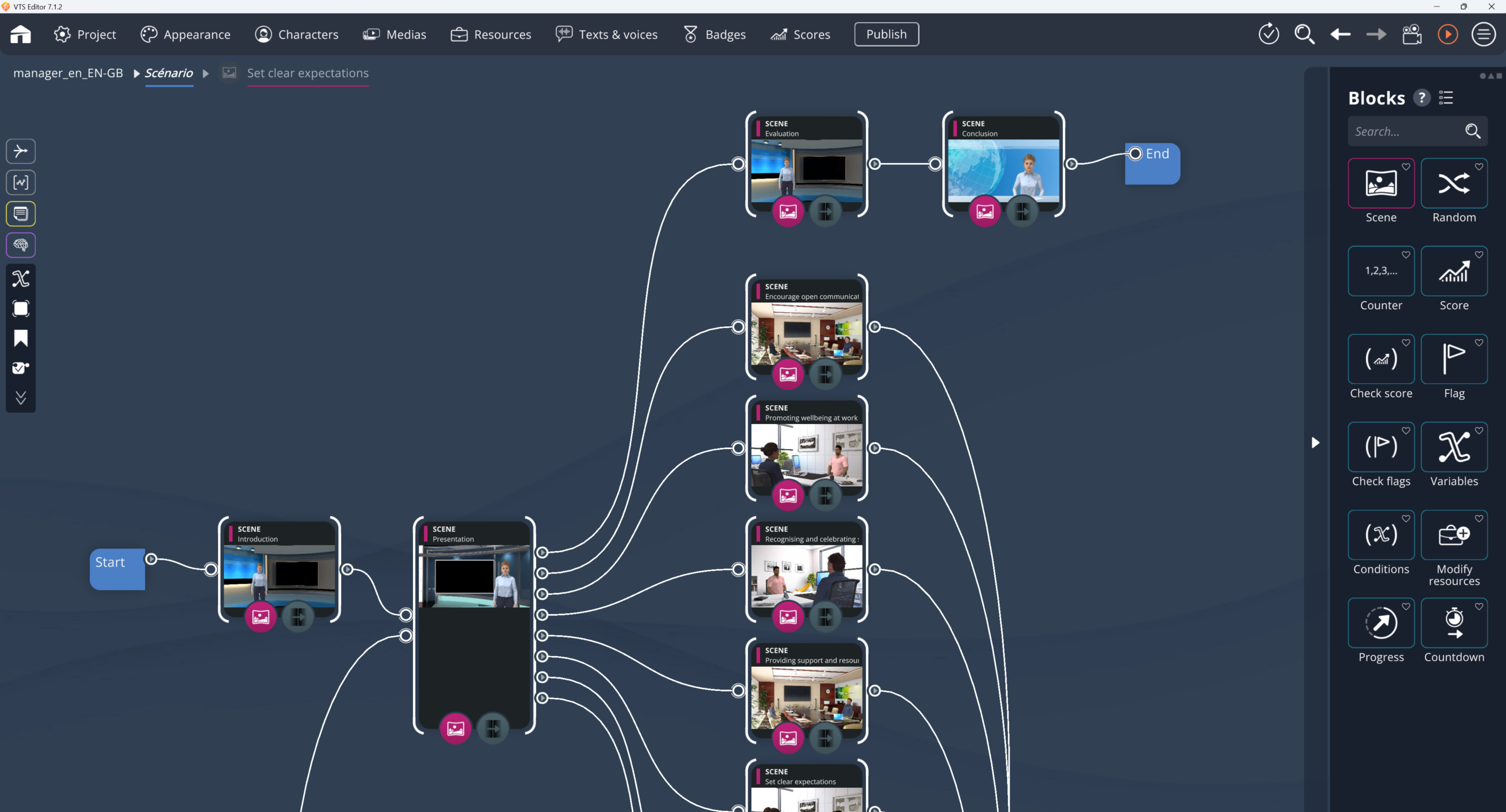
In VTS Editor, VTS Editor branching errors don’t stay discreet for long. In general, they’re obvious. The learner goes where they shouldn’t, gets stuck without understanding, comes back into a weird scene, or passes through the same spot three times like in a never-ending hallway. At that point, there’s no need for a long debate: something’s off the rails.
The good news is you don’t necessarily have to tear down the whole scenario to get things back on track. Most of the time, it’s enough to watch what actually happens in preview, identify the last executed block with F7, then trace the thread back. A miswired output. A too-fragile condition. A misconfigured return. A forgotten fallback branch. A state that doesn’t reset. In short, you fix where it goes wrong, without blowing up the rest.
VTS Editor branching errors: why it’s never “just a small bug”
In a scripted module, quality doesn’t rely only on what you’re telling. The path matters as much as the message. With every click, every choice, every answer, every timer that hits zero, the learner expects a readable consequence. If that link breaks, even once, it weakens everything.
And the effects quickly go beyond a simple “it’s kind of annoying.”
On the training side, you can lose the learner along the way. On the assessment side, you can skew results—for example if a correct answer still sends the learner to a failure branch. And at the end of production, the real cost often shows up there: a bug spotted late puts much heavier-than-expected testing back into circulation.
With a SCORM export, it becomes even a bit more sensitive. If internal navigation doesn’t hold up well, progress, pass/fail, or completion data becomes shaky—or let’s say, hard to interpret cleanly. For SCORM basics and interoperability, you can refer to the ADL site: https://adlnet.gov.
What do we mean by a branching error in VTS Editor?
In VTS Editor, a branching error corresponds to a logic or navigation defect that diverts the module from the intended instructional trajectory.
Sometimes it’s clear-cut: an output isn’t connected to anything, and the scenario stops like a car with no road. Sometimes it’s more subtle. Everything seems to work—except the scenario sends you to the wrong place. In practice, you often end up with a few fairly well-known families of issues:
- a dead end, because an output is empty;
- a wrong switch, when the output exists but leads to the wrong block;
- an unintended loop;
- a poorly handled return, often after a teleportation or a context change.
The most misleading part is that this kind of issue is often born after an apparently harmless change. You add an answer. You duplicate a scene. You rewire a quiz. You quickly refactor a function. In the moment, everything still seems to hold. Then it breaks on a less replayed case: a wrong answer, no action, a timer ending, a forgotten default output.
The signals of a branching error in a VTS Editor scenario
No need to speculate for hours. The most profitable thing to do is to start from what you can see.
Freeze: when everything locks up
The screen stays there, but nothing moves anymore. The learner doesn’t always know whether they should wait, restart, or give up. And often, let’s be honest, the graph is waiting for an action that will never happen.
Classic cases:
- a Clickable zones block waiting with an invisible zone, off-screen, or hidden;
- a Wait block left in infinite mode;
- a Scenery interaction block assumes it’s waiting for a click, even though the corresponding option isn’t enabled.
In an HSE activity, it’s a classic: “click the hazard.” Except the zone doesn’t respond. The learner can neither succeed nor fail. They’re stuck there, and that’s worse.
Skipped step: when the scenario jumps back anywhere
Here, the symptom is fuzzier. You think: “it works, but it doesn’t feel right.” A step seems to disappear. The path backtracks in a weird way. Something feels off.
The problem often comes from a poorly set return or teleportation: Teleport, Return, Clickable zones, Scenery interaction, or even the output of a Countdown.
Common example: the learner opens a secondary piece of information, then a Return sends them back to the “Last Checkpoint,” when we simply wanted to put them back exactly where they were. Technically, yes, it returns. Instructionally, it breaks the rhythm.
Loop: when a scene runs endlessly
There, in general, doubt doesn’t last long. The scenario spins its wheels. The same question comes back, the scene replays, remediation never opens anything else.
This often happens in correction paths. A Flag that was supposed to be set never is, so the Check flags block keeps sending to the same outcome. Or a Counter reaches its limit, but the graph still sends back to the starting point, with no real way out of the cycle.
Fake choice: when an answer changes nothing
It’s one of the most subtle defects, and one of the most frustrating. The learner chooses, but whatever their answer, what comes next stays the same.
Behind this issue, you often find:
- a Sentence choices block in Single output;
- multiple outputs created, but all connected to the same block;
- a Quiz also configured in Single output.
Fix a VTS Editor branching error without redoing everything
No need to relaunch a full module-wide test plan for every anomaly. The most effective approach is to find the break point, adjust locally, then retest properly.
Observe in preview (F5) and identify the block (F7)
Preview remains the best entry point. At this stage, there’s no need to invent a theory. You have to see.
- start preview with
F5; - replay exactly the path that causes the problem;
- use
F7to spot the block currently being executed.
Then, three questions are often enough:
- What was supposed to happen, instructionally, at that exact moment?
- What consequence was supposed to follow the learner’s action?
- Which output did the scenario actually go through?
Very often, the error is simple: a reversed output, a forgotten link, a poorly set wait.
Blocks to check first when you have logic errors
Not all blocks are equal in terms of risk. Some come up again and again in branching errors and logic errors.
Sentence choices: the almost mundane trap
Showing multiple lines doesn’t automatically create multiple branches.
To check:
- the Choice type;
- the Output type;
- the actual wiring of each output.
In a manager–employee scene, three visible answers aren’t enough if you want three different consequences. You need Multiple outputs, each connected to what follows.
Quiz and True/False: correct content can rest on wrong logic
The quiz text can be impeccable; if the structure doesn’t allow branching, it doesn’t save much.
Two useful reminders:
- displaying a correction doesn’t create a branch;
- if you want to distinguish correct and incorrect answers, you need real Multiple outputs that are actually used.
Clickable zones: what you can see isn’t always clickable
It’s a powerful block, but sensitive if the settings are approximate.
To check first:
- the Output type;
- the position and size of the zone;
- its layer, opacity, visibility;
- any hover aids.
Scenery interaction: one setting can flip the whole scene
With Scenery interaction, it’s easy to assume the scenario is waiting for a click. But no, not necessarily.
If Wait for click isn’t enabled, the flow can continue immediately. Result: the module pretends to offer an action, even though behind the scenes it has already bypassed it.
So it’s better to check:
- which locations are active;
- whether waiting for the click is actually enabled;
- which outputs match which locations.
Countdown: the end output has to be useful
When the timer reaches zero, the block goes out through its second output. That output has to exist—and above all, be used for something. Plan a clear consequence: customer impatience, follow-up, help, a new attempt, debrief.
VTS Editor branching errors: properly handling returns and teleportations
It’s a nasty type of error, because technically everything can seem to “work.” Yet from the learner’s perspective, the module becomes fuzzy, sometimes inconsistent.
As soon as a block teleports the flow, you need to think about the return right away.
Two main options exist:
- return to the Last Checkpoint, useful to come back to a stable step;
- return to the Last return point, preferable if you want to return exactly to the place you left.
To fix a return that brings you back “somewhere” but not to the right place:
- enable Save return point on the block that teleports;
- end the secondary sequence with a Return block set to Last return point.
When the graph looks correct, but the right branch never fires
In that case, wiring isn’t necessarily the issue. The problem often comes from the scenario’s logical state.
Flags: the system reads the real state, not the intention
A Check flags block reads what has actually been activated. If the expected Flag block was never reached, the condition stays false.
Some useful reflexes:
- give clear names to flags;
- check whether the chosen mode is AND or OR;
- avoid leaving AND by default if a single element was supposed to be enough.
Check Score: beware of impossible thresholds
You set a success threshold at 80. Great. But if the real scoring maxes out at 60, the success branch becomes unreachable.
Before validating:
- calculate the maximum score;
- look at the minimum score;
- estimate a plausible average score.
Switch: the default output has to be a safety net
A Switch sends to an output based on an integer value. If that value is unexpected, it’s the last output—the default one—that is used.
That output must be:
- connected;
- understandable;
- instructionally acceptable;
- useful during testing.
Example: a message “unexpected condition, returning to the chapter menu,” followed by a Menu or a Teleport to a stable area.
Debugging without getting it wrong: avoid testing on an already “dirty” state
When debugging, you don’t always restart from a clean state. And that’s often where analyses become confusing.
A Counter has already advanced. A Quiz has kept an answer. A Sentence choices block has already hidden certain options. You think the fix doesn’t work, when in reality you’re no longer testing the original scenario.
In that case, the Reset block is very useful. Placed just before the area to retest, it lets you start cleanly without restarting the whole module.
Reducing branching errors during design
The goal isn’t to produce a perfect scenario on the first try. On the other hand, you can make errors rarer, more visible, and less broken.
Build each scene as a complete unit
A robust scene often rests on four supports:
- a clear entry;
- an interaction;
- a consequence;
- a fallback exit.
In other words, you avoid leaving outputs dangling.
Place checkpoints in sensitive spots
It’s better to place Checkpoints before structuring moments: quiz, mission, debrief, assessment. And limit as much as possible the number of Teleport destinations. Naming also helps a lot.
Factor what repeats (functions)
If certain sequences come back often (standard help, remediation, debrief, feedback), it’s better to group them into a Function, then call them via Function Call. A fix made once then helps everywhere.
Point to keep in mind: a function runs in the context of the calling scene. If it manipulates a character, that character must exist where the function is called.
Also test the “unlikely” cases
Learners explore blind spots. So you have to deliberately test:
- wrong answers;
- no click;
- a timer left until it hits zero;
- the least likely option in a menu;
- default outputs of a Switch or a random block.
On the effectiveness of branching scenarios and, more broadly, interactive learning, you can consult academic work on the effects of active learning and testing (the principle of “retrieval practice”), for example: https://doi.org/10.1111/j.1467-9280.2006.01693.x (Psychological Science). For a synthesis on multimodal learning, also see: https://doi.org/10.1037/0033-295X.106.2.296 (Psychological Review).
Frequently asked questions about VTS Editor branching errors
Why can a VTS Editor scenario freeze without displaying an error?
Because it’s not always an explicit technical error. Often, the module is waiting for an impossible action: an invisible clickable zone, a Wait block with no end, a scenery interaction that can’t be triggered. Preview, then F7, generally make it possible to identify the block involved.
Why do multiple choices still lead to the same result?
The most common case is a Single output configuration. The block displays several answers, but produces only one path. To get real differentiated consequences, you have to switch to Multiple outputs and connect each output to a distinct continuation.
Why does a Check flags seem to always go down the wrong side?
You need to check two things: first that the expected Flag was actually activated before the test, then that the chosen logic mode is the right one. A confusion between AND and OR can be enough to skew the whole behavior.
Why does the success branch of a Check Score never trigger?
Very often, the threshold is miscalibrated. If the maximum achievable score is below the required threshold, success is impossible. You have to compare the real scoring scale to the target threshold, then adjust the passing logic.
How do you properly handle a return after a teleportation?
If the goal is to return exactly to the place you left, you need to enable Save return point on the block that teleports, then use a Return to the Last return point. If you’d rather return to a stable step of the path, it’s better to rely on a Checkpoint.
To go further with VTS Editor
- Discover the authoring tool: https://seriousfactory.com/en/authoring-software-vts-editor/
- Try Virtual Training Suite (30 days): https://seriousfactory.com/en/try-virtual-training-suite/
- Deploy and track your modules with the LMS: https://seriousfactory.com/en/vts-perform/
- See real projects created with the suite: https://seriousfactory.com/en/case-studies/
Official Serious Factory tutorials
- Clickable zones block: https://www.youtube.com/watch?v=aRyAHRa8nH0
- Quiz block: https://www.youtube.com/watch?v=8eV_N4HjrUA
References and reliability framework (SCORM, xAPI)
If you want to put these topics back into a broader framework, a few reference points remain useful:
- SCORM (Sharable Content Object Reference Model), historically maintained by ADL: https://adlnet.gov
- xAPI (Experience API, Tin Can API), specified by ADL: https://github.com/adlnet/xAPI-Spec
At the end of the day, the idea is simple. The more reliable a module’s branching is, the more meaningful the tracking data becomes. Completion rate, score, pass/fail, progress: all of that is only interpretable if the scenario itself holds up, and if VTS Editor branching errors are handled quickly.