Traditional E-Learning Is Going in Circles (and Your Employees Are Checking Out)
Clicking “Next” Is Not a Skill
We have all been there: sitting in front of a screen, finger glued to the mouse, mechanically clicking “Next” to scroll through blocks of text. It is frustrating. More importantly, it is pure passive reading, not training. The brain goes to sleep after three slides. To break this cycle and truly engage your teams, the alternative is to create an e-learning simulation that places them at the heart of the action.
For employees to adopt the right move or the right attitude with a customer, they need to try. They also need to make mistakes. Safe mistakes are what drive progress. A study by the Brandon Hall Group (2020) shows that active practice increases retention rates by around 40% compared to passive methods. This is the core principle of learning by doing: we retain what we do, not what we read.
Take a common example: a bank advisor facing an unhappy customer. A classic module will list the five steps to defuse a conflict. That looks great on paper, but when confronted with real anger, stress takes over and theory flies out the window.
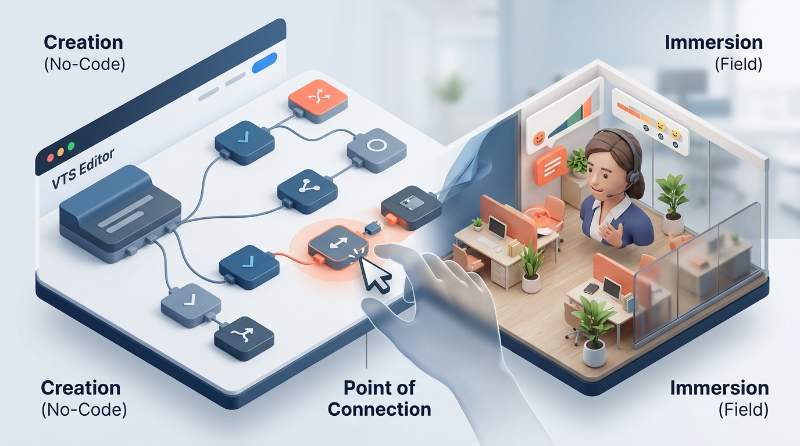
If instead you immerse them in a role-play scenario designed with the VTS Editor authoring software, the narrative changes. They are in their office, facing a virtual character who gets annoyed or calms down based on their answers. If they choose the wrong tone, the avatar raises its voice. This loop of action, error, and immediate adjustment is what triggers the click. That is how real-world skills are built.
The Hidden Cost of Custom Software Development
As soon as you want to move away from linearity to offer a genuine branching scenario, you quickly hit a technical wall. Managing variables, adjusting scores, animating characters… normally, this requires lines of code. Or developers.
For L&D teams, this is often where the headache begins: endless specifications, exhausting back-and-forth with external providers, and budgets spiraling out of control. The real issue comes six months later with the slightest product or regulatory update. Having to pay again and wait weeks just to change three lines of text is frustrating. As a result, modules age poorly, and you lose control over your own content.
VTS Editor: How to Create an E-Learning Simulation with a Mouse, Without Coding
Visual Drag-and-Drop Interface
We designed our tool specifically to avoid this technical struggle. The idea is simple: replace code with a purely visual interface. In practice, you draw your learning path like a logic flow or a decision tree. This simplicity allows you to create an e-learning simulation without any prior technical skills.
You grab a block and drag it onto the screen: a line of dialogue, a choice of answer, a score, an emotional gauge. You draw arrows to connect them. In short, you focus on the story and the educational impact, not the technology.
- Clear learning paths: Instantly visualize the different routes a learner can take based on their decisions.
- Purposeful gamification: Add stress gauges, scores, or timers in a few clicks to spice up the scenario.
- Realistic assessment: Ideal for measuring whether field reflexes are truly mastered before sending teams back to customers.
Characters and Sceneries That Match Your Daily Field Reality
For the training to click, learners need to recognize themselves in what they see. If a workshop technician takes a simulation set in an ultra-modern, open-space office, they will check out.
In VTS Editor, you choose from a wide library of animated 3D avatars dressed for your specific sector: a doctor’s coat, a construction vest, office wear… Their faces react. If a manager handles a situation poorly, their virtual counterpart will frown or cross their arms. It is subtle, but it makes all the difference for immersion.
We offer dozens of 2D, 360-degree, and virtual reality sceneries. And if your industry demands absolute fidelity to your actual premises or uniforms, our teams can create custom characters and custom sceneries to perfectly match your environment.
Productivity: AI Speeds Up Creation, the Expert Guides the Pedagogy
We take a highly pragmatic approach to Artificial Intelligence. AI is a great production assistant to move quickly, but the human remains at the helm of the pedagogy. Within VTS Editor, the built-in AI handles the tedious groundwork for you:
- Beating writer’s block: Provide your learning objectives, and the AI generates a coherent initial narrative outline for you to refine.
- Translating in the blink of an eye: Localize your modules into multiple languages without breaking your branching structures or decision trees.
- Generating unique sceneries: Need a retro post office or a specific lab? Just describe it, and the AI creates the 2D or 360-degree environment.
Deployment: Take Back Control of Your Training
Universal Compatibility
Once your module is ready, you can export it to SCORM (1.2 or 2004) format in one click. It will run smoothly on your existing LMS, whether your learners access it via PC, tablet, or even virtual reality headsets.
If you want to go a step further than the often-limited completion tracking of traditional LMSs, you can distribute your simulations via VTS Perform. This is our dedicated platform for tracking actual scores, analyzing learning behaviors, and managing skill development. It is ideal for securing high-stakes regulatory or technical paths, as shown by SICA Nucléaire, which uses our solutions to validate field certifications.
No More Exhausting Back-and-Forth for the Slightest Update
Has an internal procedure changed? A product updated? No need to reopen a complex development project. Simply open VTS Editor, edit the text or path in your decision tree, and republish. It is sorted in five minutes, in-house, without spending an extra cent. That is true autonomy to create an e-learning simulation that is always up to date.
And if your teams are short on time or resources to get started, we can also co-design these custom projects hand-in-hand with you, tailored to your field needs.
Your Questions, Our Answers
Can you really create a serious game without knowing how to code?
Yes, that is precisely why we developed the tool. If you can draw a diagram with arrows on a whiteboard to explain a situation to a colleague, you can use VTS Editor. It is highly visual and intuitive.
Is compatibility with my current LMS guaranteed?
Yes. Our exports strictly comply with SCORM 1.2 and 2004 standards. Your modules will integrate naturally with your existing tool. And if you want to get behavioral analysis that goes deeper than a simple “completed / not completed” status, our VTS Perform platform is built exactly for that.
How do we measure the real impact on learners?
The system records choices, errors, response times, and gauge progression throughout the simulation. This qualitative data is sent directly to your LMS or VTS Perform. This allows you to instantly pinpoint where your teams are struggling and adjust your support actions accordingly.
How does AI concretely help the designer?
It acts as an accelerator. It can suggest scenario structures adapted to your objectives, translate your texts while preserving your branching logic, or create custom visual environments from a simple description.
Training Over Broadcasting
Pure theory has its limits: you do not learn to negotiate or manage a crisis by reading slides. It is through repeated practice that we improve and build confidence. By removing technical barriers, your instructional design teams can finally focus on what really matters: designing stimulating, realistic, and useful daily training.
If you want to see exactly how to integrate simulations into your current training paths, let’s discuss it in a call focused on your field challenges.